Claude Cruise 🚗💨
Anthropic recently announced auto mode:
Auto mode provides a safer long-running alternative to
--dangerously-skip-permissions.
I saw this as an interesting middle ground between YOLO mode (--dangerously-skip-permissions) and approval fatigue, but I immediately ran into some problems and instead found my own solution: cruise mode.
To step back for a moment, I have very carefully curated, largely user-scoped permissions for Claude — auto-approve, always deny, sandboxing — but what I have found is that there are edit/write actions (send Slack message, update Jira tickets, push and create pull request) where I run into approval fatigue, especially for bulk actions. The answer is not to always allow these actions. I have seen Claude go off the rails too often for that, but I do want a surgical way of auto-allowing actions. To be clear, there are right and wrong times for cruising:
- ❌ A long-running conversation without a targeted objective: I have seen Claude mix up Slack channel IDs when there are multiple in its history. Or if I have approved an action in the past, it can get eager and just go without checking in, only for me to later realize I was spamming Slack with messages I didn’t approve.
- ✅ A clean conversation with a clear objective: This is an art, not a science, but with practice you develop intuition for when a conversation is likely to go off the rails and can assess your risk tolerance.
Problems with auto mode
There are two main realizations I had while exploring auto mode.
1. You need a team plan
It may be easy to glance past this:
Auto also requires a Team plan…so the option may remain unavailable even with the flag.
Turns out --enable-auto-mode just makes it an available option in the Shift+Tab cycle. To enable it by default you should set --permission-mode auto, however if it is unavailable nothing will change, which you can see by cycling through the permission modes.
2. LLM classifier isn’t the right tool for the job
I still like the idea, especially the fact that you can customize the classifier prompts. But I tend to agree that non-deterministic solutions aren’t solutions.
Enter cruise mode
The realization in these stumblings is that the better approach was already there: --allowedTools. You can simply have a list of allowed tools that extends your defaults when starting/resuming a Claude Code session. It’s deterministic, immediate, zero token cost, and it can be combined with any permission mode.
Shell Function
Because the command is verbose, I have it as a shell function in my ~/.bash_profile:
claude-cruise() {
    CLAUDE_CRUISE=1 claude --permission-mode acceptEdits \
        --allowedTools "mcp__plugin_slack_slack__slack_send_message" \
        --allowedTools "mcp__plugin_slack_slack__slack_schedule_message" \
        --allowedTools "mcp__plugin_atlassian_atlassian__transitionJiraIssue" \
        --allowedTools "mcp__plugin_atlassian_atlassian__editJiraIssue" \
        --allowedTools "mcp__plugin_atlassian_atlassian__addCommentToJiraIssue" \
        --allowedTools "mcp__plugin_atlassian_atlassian__createJiraIssue" \
        --allowedTools "mcp__plugin_atlassian_atlassian__createIssueLink" \
        --allowedTools "mcp__plugin_atlassian_atlassian__addWorklogToJiraIssue" \
        --allowedTools "mcp__plugin_github_github__create_pull_request" \
        --allowedTools "mcp__plugin_github_github__update_pull_request" \
        --allowedTools "mcp__plugin_github_github__update_pull_request_branch" \
        --allowedTools "mcp__plugin_github_github__push_files" \
        --allowedTools "mcp__plugin_github_github__pull_request_review_write" \
        --allowedTools "Bash(git push)" \
        --allowedTools "Bash(git push *)" \
        "$@"
}
Of course you can customize — add/remove tools to your comfort level.
Statusline Indicator
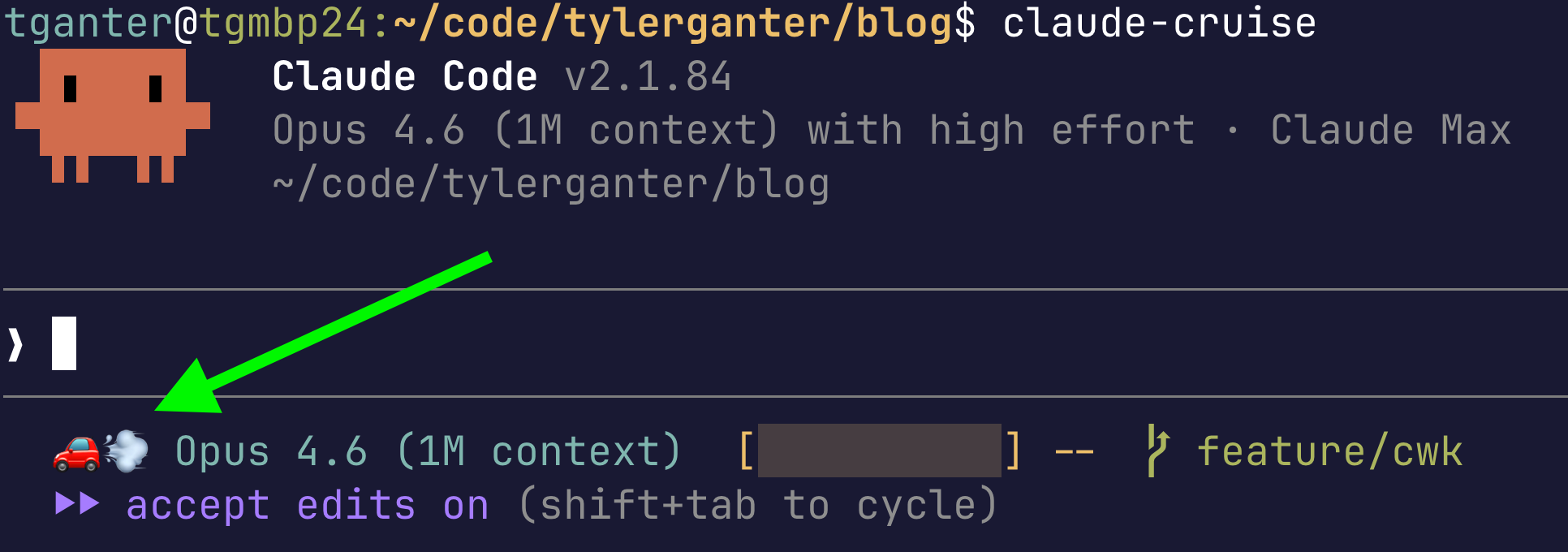
I have a custom statusline providing extra information for my session. CLAUDE_CRUISE=1 drives a 🚗💨 indicator in the status bar. You can see the updated script here.
Tip: Mid-Session Upgrade Workflow to Cruise Mode
Useful when you hit approval fatigue partway through a task. Again, the primary use case to me is bulk operations or a clear workflow where the tracks are laid for high probablility of success.
─────────────────────────────────────────────────────────────────────────
❯ /rename
❯ /exit
─────────────────────────────────────────────────────────────────────────

$ claude-cruise --resume "<session-name>"
I still like the idea of auto mode. There is no perfectly secure system that is also useful. Assuming it is reasonably efficient and effective, I will welcome one more layer of security when it is ready, and I will likely fold it in with --allowedTools.
Happy cruisin’!